PLM Buyer’s Guide - Top 15 Product Lifecycle Management Vendors

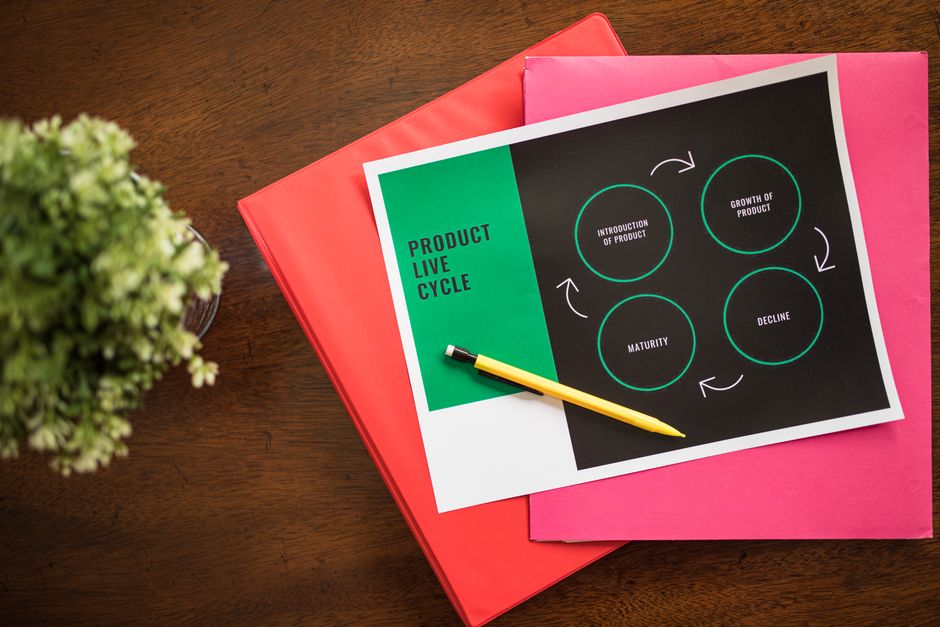
For mid-sized and large brands evaluating PLM vendors, start with a shortlist of three providers offering native analytics dashboards and clear views into product data. A solid platform integrates CAD, ERP, and supply chain data, enabling cross-functional teams to move faster by eliminating manual handoffs and reducing change orders across revisions.
What to measure early: track ECO cycle time, data migration accuracy, and the rate of compliant changes. Look for end-to-end workflows from concept to manufacturing, with native integrations to ERP, CAD tools, and supplier portals.
For organizations spanning mid-sized to large brands, favor vendors with modular apps and scalable data models, plus analytics that deliver both high-level views and drill-down details. The right choice supports making critical decisions on time, reduces errors in orders, and aligns with product strategy across regions based on your policy.
Deployment flexibility matters: choose a platform that can be deployed on-premises or in the cloud, with a modern architecture and broad API coverage to connect with ERP, MES, and PLM partners. This keeps teams productive across design, engineering, manufacturing, and procurement while ensuring you comply with regulations.
Finally, review reference cases from brands similar in size and industry. Look for shorter cycle times, fewer revisions, and higher data quality. A plan combining native modules with strong integrations tends to deliver faster ROI and eventually unlock more value as you scale from mid-sized to large operations.
Vendor Landscape and Practical PLM Buying Criteria
Begin with an all-in-one PLM that integrates with ERPCRM, supports 2d3d visualization, and can be adopted in staged steps to cover full product lifecycle for pharmaceutical brands. This recommendation reduces risk and accelerates value realization from day one.
Adopted practices show phased onboarding yields smoother adoption, clearer ROI, and a solid path for teams across the organization. Use this checklist to compare providers against your current processes and to guide decisions for some teams still evaluating options.
- Strategic fit: Confirm the platform handles both discrete and pharmaceutical workflows, with robust change control, BOM, ECO, and data lineage across full lifecycle.
- Integration and architecture: Verify open APIs, event-driven data exchange, and native integrations with erpcrm and saps; plan to integrate CAD/PLM 2d3d data and external components.
- Regulatory and quality: Ensure audit trails, electronic signatures, validation, and data integrity controls meet pharma requirements; support for GxP and 21 CFR Part 11.
- Data governance and organization: Require structured master data, organized taxonomy, versioning, data lineage, and protection of precious IP across teams; emphasize integrating sources across domains.
- Adoption model and cost: Favor options that allow phased adoption, use per-module or all-in-one licensing, and predictable TCO with clear upgrade paths.
- Flexibility and customization: Prefer configurations and templates that can be adjusted without heavy coding; support process improvements with minimal disruption.
- Evidence of performance and support: Look for active product roadmaps, a strong customer community, and measurable service levels across regions.
- Migration and risk management: Assess data migration plans, sandbox environments, and controls for data privacy and security; test end-to-end in pilot teams.
- Vendor ecosystem and references: Check references in pharmaceutical brands and life sciences; verify integration success with similar erpcrm stacks and QA tools.
Vendor options at a glance:
All-in-one suites offer full lifecycle coverage, strong
- All-in-one suites offer full lifecycle coverage, strong governance features, and simplified user experience for brand teams.
- Life sciences specialists provide targeted regulatory modules and validated workflows that align with pharmaceutical practices.
- Open-platform PLMs deliver flexibility to integrate into existing stacks and adapt into evolving processes with low-code tooling.
- Cloud-native solutions reduce IT burden and enable scalable collaboration across distributed teams.
To close, demand a practical data migration plan, a clear ROI tied to critical processes such as change management and quality, and a realistic path for integrating into your current erpcrm and data ecosystems. Choosing a platform that works across teams helps maintain momentum and data quality.
What is PLM software? Core concepts, modules, and business value
Start with a modular PLM that links design, engineering, and manufacturing in a single interface, address the need to minimize rework, and map it to your ppap workflow to reduce frustrating handoffs and continue to improve profitability.
Core concepts: a PLM houses a unique product data model with linked artifacts and a lifecycle that spans ideation to obsolescence. It tracks revisions and keeps auditable change records; this connected, cross-functional visibility opens collaboration across teams.
Key modules include Data and Document Management; BOM and Product Structure; Change and Revision Management; vismockup for early validation; Virtual Reviews; Project Tracking; Quality and PPAP readiness; Supplier Collaboration via Chat; Training and Adoption; and aras Integration across platforms. These components open paths for both internal teams and external partners.
Business value arises from connected data, simplified workflows, and disciplined change control. The result: faster time-to-market, lower waste from fewer revisions, and stronger profitability through better visibility over the lifecycle and compliance across the product life span. The approach covers both aspects and extended processes, such as supplier involvement and quality assurance.
Implementation begins by defining the data model, setting up core workflows, and selecting a pilot scope. Establish a ppap readiness check, map change to revisions, and build a training plan. Include chat and virtual reviews to accelerate adoption.
Many programs began with a design-office pilot and then expanded to manufacturing and supplier networks; a connected data backbone helps you continue to scale and opens new opportunities to monitor performance and profitability.
| Module | Key value |
|---|---|
| Data & Document Management | Unique, linked records; single source of truth; improves traceability. |
| BOM & Product Structure | Clear part relationships; supports revisions and change control across domains. |
| Change & Revision Management | Controlled workflows; auditable records; reduces risk of misalignment. |
| vismockup | Early visualization; supports design reviews before prototypes. |
| Virtual Reviews | Remote sign-offs; speeds decision-making; lowers travel. |
| PPAP & Quality | Ensures ppap readiness and compliance; links to supplier data. |
| Chat & Collaboration | Connected conversations; accelerates issue resolution across teams. |
| Training & Adoption | Reduces ramp time; improves proficiency across roles. |
| aras Integration | Linked with broader ecosystems; opens flexibility for customization. |
Shortlisting the Top 15 vendors: criteria, scoring, and benchmarks

Make the shortlist based on a clearly defined needs map and realtime scoring, with dashboards visible to selected stakeholders across corporate teams.
Needs alignment and strategic fit Map needs across corporate functions, rate how each vendor’s roadmap aligns with your product lifecycle goals, regulatory requirements, and market strategy. Ensure selected vendors cover core PLM areas and support planning across supplier interactions, with documentation that supports a consistent basis for decision making across members of the evaluation team.
Functionality breadth and 2d3d capability Verify coverage of core PLM modules: change management, BOM, ECO, workflow, CAD integration, and 2d3d capture. Look for a robust, flexible feature set with interactive modeling, realtime visualization, and a setup that can be deployed across multiple sites. Score each vendor on how deeply they cover end-to-end lifecycle tasks and whether their 2d3d tools integrate with existing CAD ecosystems.
Data integration and realtime capture Check API breadth, ERP connectors, cloud/on-prem options, and data migration paths. Validate master data governance and the ability to capture changes in realtime, with reliable audit trails and mastercontrol for compliance during changes.
Scalability and setup Favor vendors with a scalable, modular setup that supports multi-site deployments, flexible licensing, and straightforward onboarding for new business units. Prefer cloud-native architectures that ease rollout across regional teams, with predictable maintenance windows and minimal downtime.
Risk, security, and market presence Evaluate supplier stability, security posture (SOC 2, ISO 27001), and market traction. Verify customer references and case studies across industries to confirm product maturity and ongoing support. Use benchmark data from the market to compare response times and upgrade cadence.
Scoring model and benchmarks Apply a 5-block scoring grid: 40% capability and roadmap, 30% integration and realtime capture, 15% scalability and setup, 10% security and risk, 5% cost and TCO. Vendors must reach a minimum threshold in each block to be shortlisted for pilots. Use a 0–100 scale with clear definitions for each score, and publish the results to ensure consistency across the team.
Practical evaluation steps Run interactive product demos with a representative set of members from design, manufacturing, and IT. Use Scenarios to compare how each vendor handles planning, master data changes, and 2d3d visualization. Capture feedback in a centralized mastercontrol document and track action items until decisions are made; this helps eliminate ambiguity and speeds up the final selection.
Final shortlist and next steps After scoring, select 8–12 finalists for pilots, then pick 3–5 for deeper evaluation and contract negotiations. Record chosen vendors, keep the selected list aligned across market teams, and ensure the setup supports ongoing governance and consistency across corporate needs.
In practice, this approach reduces risk and supports a robust, scalable PLM setup that is flexible to changing needs and supplier dynamics across the market.
Deployment models: SaaS vs on-premises vs hybrid and what to
Deployment models: SaaS vs on-premises vs hybrid and what to consider
Recommendation: Choose SaaS for most PLM deployments. It shortens setup, reduces upfront infrastructure costs, and delivers realtime collaboration with seamless updates across teams. mastercontrol offers robust SaaS options for regulated contexts, and dassault provides strong industry momentum with an integrated interface. It opens opportunities to connect PLM with docs, visualization, and marketing workflows.
Why SaaS works well: predictable operating expenses, fast time-to-value, and automatic, frequent updates from providers. Real-time data sharing helps cross-functional teams align on design decisions; gantt-style views support project planning; an open interface and solid docs help you integrate with external tools without heavy custom coding. They can click through dashboards to monitor milestones and keep customer-facing status visible in market communications.
On-premises fits when you must keep data on-site, protect IP, or tailor workflows to legacy systems. You control the setup, upgrade cadence, and security policies, and you can build highly customized interfaces. The price tag includes hardware, virtualization, and dedicated ops; you own backups and DR plans, and you manage compliance with internal standards. The downside: longer deployment, higher maintenance, and slower delivery of new features, which may create problems for marketing and customer teams relying on rapid changes.
Hybrid deployments offer a compromise: store sensitive data on-prem while leveraging SaaS for collaboration, workflow automation, and visualization. This approach preserves governance and passes updates from the cloud while keeping core IP on-site. It hinges on open APIs; it opens the door to new integration paths with your ERP, docs, and marketing tools. Ensure a unified interface so teams no longer switch between separate views.
To decide, map teams and processes: marketing, engineering, customer support, and regulatory. Define data sensitivity levels; rate the maturity of your workflows; estimate total cost of ownership over 3-5 years; review each vendor’s roadmaps and security posture; run a pilot with representative scenarios; and verify migration paths. Ask: will the platform reduce problems in change management, accelerate approvals, and support real-time collaboration? Look for scalable performance, strong audit trails, and reliable support that aligns with your growth in the market. This is crucial for delivering consistent customer experiences and keeping teams productive.
Practical tips for choosing: start with a short, focused pilot that includes mastercontrol-like governance needs and dassault-style visualization requirements. Check the interface for a simple click path and intuitive workflows; confirm updates are non-disruptive and well-documented; verify extra security controls and role-based access; compare total cost of ownership across models; ensure integration with existing docs repositories, gantt planning, and marketing tools; ensure open APIs and data portability so you can switch providers if needed.
Data strategy and integrations: APIs, standards, and connectors
Data strategy and integrations: APIs, standards, and connectors to CAD/ERP
Recommendation: Adopt an API-first data layer that exposes product-related data as reusable services that CAD/ERP apps can call directly. This must be paired with native CAD/ERP connectors; it accelerates time-to-value by eliminating translation layers and data drift.
Define a canonical data model aligned with standards such as ISO 10303 (STEP) and AP214/AP242 for geometry, configuration, and BOM, including parametric attributes. This alignment enables cross-domain exchange across CAD, PLM, and ERP, supports automation, and drives optimization of data consistency and lifecycle tracking.
Establish data governance with maturity metrics: track data lineage, versioning, and change history; set a clear maturity target and provide recognition for improvements. This foundation reduces product-related problems and boosts confidence across design, manufacturing, and supply chain.
Choose connectors with native support for major CAD tools (SolidWorks, Creo, NX, CATIA, AutoCAD) and ERP systems (SAP, Oracle, Dynamics 365). Prioritize connectors that enable data to move directly between CAD, PLM, and ERP, covering geometry, BOM, configurations, and change events, using RESTful or event-driven APIs that support secure channels and minimal latency.
To accelerate automation, set up an API gateway and a service layer that exposes common data contracts (part numbers, geometry, tolerances, revisions) and use versioned APIs to avoid breaking changes. Start with a 90-day rollout: 2 CAD connectors (SolidWorks and Autodesk Inventor) and 1 ERP connector (SAP) in Q1, then expand to 4 CAD and 2 ERP connectors by Q3. This ensures product data moves directly through design, manufacturing, and supply chain tasks, boosting productivity and user-friendly experiences.
kanban boards help coordinate integration tasks and issue tracking. Tie kanban to office dashboards so stakeholders recognize progress and act quickly. This approach reduces cycle times and improves cross-functional collaboration.
Apply ishikawa analysis to product-related problems in data flow. Use the diagram to map causes by people, process, tools, and data, then translate findings into concrete actions that tighten API contracts and connector performance.
In practice, never rely on a single vendor path. Favor standards-based, multi-vendor connectors and test data exchange in sandbox environments before production. Regular automated checks on change events enforce governance and raise trust across the PLM stack.
With a cohesive data strategy connecting CAD geometry, ERP attributes, and PLM workflows through native integrations, teams gain higher productivity, less rework, and clearer data recognition across the lifecycle.
Cost, ROI, and implementation timelines: licensing, services, and risk factors

Start with a tiered licensing plan tied to scope and customer needs, and lock in a 90-day window to quicker value realization via a controlled pilot.
Licensing and costs: SaaS per-user monthly pricing, module bundles, and enterprise licenses with volume discounts. For a mid-size organization (100–250 active users), expect SaaS in the $35–70 per user per month range; enterprise licenses offer predictable annual spend with 15–25% additional savings when committing multi-year. Professional services typically run 15–25% of software costs for data migration, ERP/CAD integration, and user onboarding; use vendor accelerators and pre-built templates to shorten the path to value. capterra comparisons help validate pricing realism, scope clarity, and vendor support expectations.
ROI drivers include faster cycle times, reduced rework, and improved reuse of designs across products. Track metrics: cycle time per change, number of rejected changes, first-pass yield, and improved navigation of product data across systems for visibility in the workgroup. When designers can navigate product data quickly and apply parametric changes, approvals enable faster decisions and bottlenecks in the order management chain shrink. Expect payback in 9–18 months for mid-size deployments; larger programs can reach 24 months as data quality and governance mature. This setup enables benefits to compound over time.
Implementation timelines depend on architecture complexity, data scope, and ERP/CAD integrations. Small pilots finish in 6–12 weeks; mid-size programs run 4–6 months; large, multi-system deployments with migration windows span 9–12 months. Build includes discrete milestones: data cleansing, interface mapping, and validation tests; migration windows should minimize production impact. Each change or addition to scope should require explicit approval to avoid drift.
Key risk factors include data quality, incomplete scope definitions, integration gaps, and change-management resistance. Mitigate with a cross-functional workgroup that meets weekly, explicit approvals, and a living risk register. Security and regulatory compliance, including rohs, require continuous controls and audits. This approach opens data channels to external systems, increasing visibility across teams and suppliers, while standardizing processes helps sustain long-term benefits. It also supports sustainability reporting and traceability across products. In the future, design for modular builds, maintain capterra-ready benchmarks, and ensure capabilities to support large-scale products across diverse aspects of the lifecycle.
Ready to leverage AI for your business?
Book a free strategy call — no strings attached.


