शॉपिफाई एसईओ ऐप्स - क्या वे इसके लायक हैं? अपनी दुकान की दृश्यता बढ़ाने के लिए एक व्यावहारिक मार्गदर्शिका

शॉपिफाई बॉक्स से बाहर एसईओ-फ्रेंडली है, लेकिन अधिकांश दुकानें जल्दी ही एक सीमा पर पहुंच जाती हैं। कारण सरल है: ई-कॉमर्स एसईओ को लगातार ऑन-पेज कार्य, तकनीकी जांच और गति नियंत्रण की आवश्यकता होती है। एसईओ ऐप्स इसमें मदद कर सकते हैं। हालांकि, वे जादू नहीं हैं। असली सवाल यह है कि क्या वे आपकी दुकान के लिए मापनीय आरओआई प्रदान करते हैं।
यह गाइड शॉपिफाई एसईओ ऐप्स कब इसके लायक होते हैं, क्या देखना है, और अनुमान के बिना प्रभाव को कैसे मापें, इसकी व्याख्या करता है।
त्वरित उत्तर: हाँ, यदि आप उन्हें ठीक से परीक्षण करते हैं
एक शॉपिफाई एसईओ ऐप तब इसके लायक होता है जब यह समय बचाता और रैंकिंग या रूपांतरणों को सुधारता है। जानने के लिए, छोटे से शुरू करें:
- एक गति-अनुकूलित एसईओ ऐप इंस्टॉल करें।
- बेसलाइन मेट्रिक्स ट्रैक करें।
- 6–8 सप्ताह के लिए प्रभाव मापें।
यदि जैविक ट्रैफिक और बिक्री बढ़ती है, तो निर्णय स्पष्ट है। यदि नहीं, तो ऐप हटाएं और दूसरा दृष्टिकोण परीक्षण करें। एसईओ ऐप्स को आपके स्टैक में अपनी जगह कमानी चाहिए।
शॉपिफाई एसईओ ऐप्स क्यों काम कर सकते हैं
एसईओ ऐप्स उपयोगी हैं क्योंकि वे दोहराव वाले कार्यों को बड़े पैमाने पर स्वचालित करते हैं। कई दुकानों के लिए, इसका मतलब है:
- उत्पादों और संग्रहों के लिए बल्क मेटाडेटा अनुकूलन
- कम त्रुटियों के साथ संरचित डेटा (स्कीमा) सेटअप
- इमेज संपीड़न और alt टेक्स्ट स्वचालन
- रिडायरेक्ट और 404 सफाई
- साइटमैप सुधार
संक्षेप में, वे मैनुअल कार्य को कम करते हैं और एसईओ नियमों को लगातार लागू करने में मदद करते हैं।
कब एसईओ ऐप्स इसके लायक नहीं होते
यदि निम्नलिखित हो तो एसईओ ऐप्स के लिए भुगतान करने लायक नहीं हैं:
- आपकी दुकान में ~30 से कम उत्पाद हैं और आप मैनुअली अनुकूलित कर सकते हैं।
- ऐप भारी स्क्रिप्ट्स जोड़ता है और मोबाइल प्रदर्शन को धीमा करता है।
- आपके पास पहले से मजबूत आंतरिक एसईओ वर्कफ्लो और तकनीकी समर्थन है।
- आप ऐप से बिना रणनीति के “एसईओ ठीक” करने की अपेक्षा करते हैं।
एक ऐप आपकी रणनीति की सहायता कर सकता है, लेकिन इसे प्रतिस्थापित नहीं कर सकता।
शॉपिफाई एसईओ ऐप में क्या प्राथमिकता दें
सभी ऐप्स समान नहीं हैं। अपनी दुकान के आकार, थीम और लक्ष्यों के आधार पर चुनें।
1. एआई-संचालित मेटाडेटा और कीवर्ड समर्थन
ऐसे टूल्स देखें जो उत्पन्न या सुधार सकें:
- शीर्षक टैग
- मेटा विवरण
- उत्पाद और संग्रह टेम्प्लेट्स
- कीवर्ड सुझाव
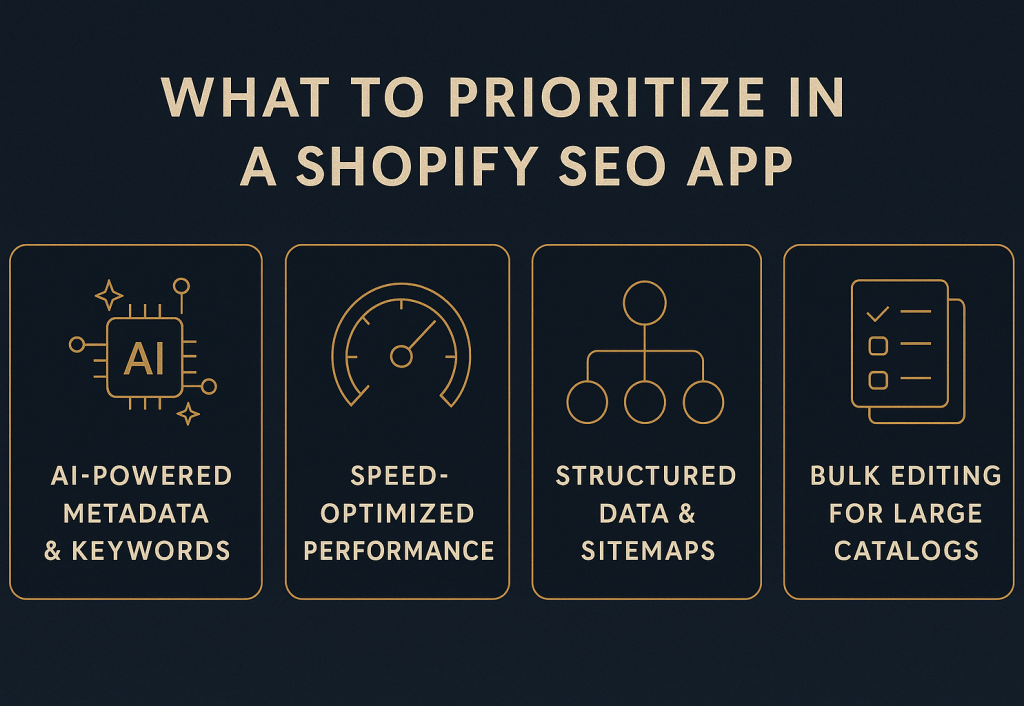
शॉपिफाई एसईओ ऐप को परीक्षण करने लायक बनाने वाले चार मुख्य मानदंड।
एआई यहां सहायक है, लेकिन केवल यदि आप आउटपुट की समीक्षा करते हैं और उन्हें अपनी ब्रांड आवाज के साथ संरेखित रखते हैं।
2. गति-अनुकूलित प्रदर्शन
गति एक रैंकिंग और रूपांतरण कारक है। ऐप्स से बचें जो आपकी दुकान को बोझिल बनाते हैं।
ऐसे ऐप्स चुनें जो:
- कुशलतापूर्वक लोड हों
- साइट-वाइड बड़े स्क्रिप्ट्स इंजेक्ट न करें
- विशिष्ट पृष्ठों के लिए चयनात्मक सक्रियण की अनुमति दें
- गति डैशबोर्ड या कोर वेब विटल्स फीडबैक साझा करें
3. संरचित डेटा और साइटमैप टूल्स
शॉपिफाई थीम्स बहुत भिन्न होती हैं। आपका ऐप प्रदान करना चाहिए:
- उत्पाद स्कीमा
- संग्रह स्कीमा
- ब्रेडक्रंब स्कीमा
- रिच रिजल्ट्स परीक्षण
- गतिशील, साफ साइटमैप अपडेट
4. बल्क संपादन और बड़े कैटलॉग समर्थन
यदि आप 500+ उत्पाद प्रबंधित करते हैं, तो बल्क टूल्स आवश्यक हैं। पुष्टि करें:
- उत्पादों, संग्रहों, ब्लॉग्स के लिए बल्क संपादन
- आयात/निर्यात सेटिंग्स
- टेम्प्लेट या पृष्ठ प्रकार प्रति नियंत्रण
5. थीम और पेजफ्लाई संगतता
यदि आप पेजफ्लाई (या समान बिल्डर्स) का उपयोग करते हैं, तो पहले संगतता जांचें।
एक अच्छा ऐप को आपके मौजूदा टेम्प्लेट्स के साथ काम करना चाहिए बिना हार्ड कोड परिवर्तनों की आवश्यकता के।
एक व्यावहारिक शॉपिफाई एसईओ रणनीति (ऐप्स के साथ या बिना)
ऐप्स को एक संरचित एसईओ योजना का समर्थन करना चाहिए। उच्च-प्रभाव वाले पृष्ठों से शुरू करें और बाहर की ओर बढ़ें।
चरण 1: पहले तकनीकी त्रुटियों को ठीक करें
एक क्रॉल चलाएं और साफ करें:
- 404 पृष्ठ
- रिडायरेक्ट चेन
- डुप्लिकेट यूआरएल
- कैनॉनिकल टैग मुद्दे
ये सुधार क्रॉलेबिलिटी को जल्दी सुधारते हैं।
चरण 2: शीर्ष उत्पाद और संग्रह पृष्ठों को अनुकूलित करें
उन शीर्ष 20% पृष्ठों पर ध्यान केंद्रित करें जो अधिकांश राजस्व उत्पन्न करते हैं।
अपडेट करें:
- शीर्षक
- H1 शीर्षक
- मेटा विवरण
- उत्पाद कॉपी (डुप्लिकेट्स से बचें)
चरण 3: आंतरिक लिंक्स को व्यवस्थित रूप से बनाएं
आंतरिक लिंक्स प्राधिकार फैलाते हैं। इसे जानबूझकर करें:
- श्रेणी पृष्ठों से बेस्ट सेलर्स को लिंक करें
- अनाथ पृष्ठों को ठीक करें
- पिलर कंटेंट बनाएं और संग्रहों को लिंक करें
चरण 4: शॉपिफाई-विशिष्ट संरचित डेटा जोड़ें
ई-कॉमर्स में स्कीमा अधिक महत्वपूर्ण है क्योंकि यह रिच रिजल्ट्स को बढ़ावा देता है।
स्कीमा का लक्ष्य:
- 70%+ उत्पाद पृष्ठों पर
- संग्रहों पर
- ब्रेडक्रंब्स पर
- समीक्षाओं पर (जब प्रासंगिक हो)
चरण 5: बहुभाषी एसईओ को ठीक से संभालें
यदि आप कई स्थानों की सेवा करते हैं, तो आपको साफ संकेतों की आवश्यकता है।
कार्यान्वित करें:
- hreflang टैग
- अनुवादित मेटाडेटा
- भाषा-विशिष्ट साइटमैप
- प्रति स्थान सही कैनॉनिकल्स
यह डुप्लिकेशन को कम करता है और बाजार के अनुसार इम्प्रेशन बढ़ाता है।
चरण 6: हर चरण पर गति की रक्षा करें
यदि आपकी दुकान धीमी हो जाती है तो एसईओ लाभ गायब हो जाते हैं।
लक्ष्य:
- मोबाइल लोड समय 2 सेकंड से कम
- LCP < 2.5 सेकंड
- CLS < 0.1
इसे करें:
- इमेज संपीड़न (WebP)
- नीचे-फोल्ड एसेट्स के लिए लेजी लोडिंग
- CSS/JS मिनिफाई करना
- अनुपयोगी ऐप्स हटाना
ऐप्स के साथ ऑन-पेज एसईओ को स्वचालित करना
स्वचालन मध्यम-से-बड़े कैटलॉग वाली दुकानों के लिए सबसे उपयोगी है।
शीर्षक टैग स्वचालन
शीर्षकों को सुसंगत और अद्वितीय रखें।
एक विश्वसनीय फॉर्मूला:
{प्राथमिक कीवर्ड} – {उत्पाद नाम} | {ब्रांड}
नियम:
- 60 अक्षरों से कम
- प्राथमिक कीवर्ड पहले
- कोई डुप्लिकेट्स नहीं
मेटा विवरण स्वचालन
मेटा विवरण सीटीआर सुधारते हैं। एक साफ टेम्प्लेट का उपयोग करें जैसे:
{उत्पाद} खोजें। {फीचर/लाभ}। तेज शिपिंग और आसान रिटर्न।
नियम:
- 150–160 अक्षर
- स्पष्ट लाभ + सीटीए
- कीवर्ड स्टफिंग से बचें
Alt टेक्स्ट स्वचालन
Alt टेक्स्ट पहुंचनीयता और इमेज एसईओ का समर्थन करता है।
टेम्प्लेट उदाहरण:
{उत्पाद} {संग्रह} में {फीचर} दिखाते हुए
नियम:
- 125 अक्षरों से कम
- वर्णनात्मक, स्पैमी नहीं
- कीवर्ड केवल प्राकृतिक होने पर शामिल करें
बल्क अपडेट्स के बाद, इंडेक्सेशन को तेज करने के लिए अपना साइटमैप पुनः सबमिट करें।
प्रभाव मापना और आरओआई साबित करना
आपको जटिल टूलिंग की आवश्यकता नहीं है। आपको स्पष्टता और सुसंगति की आवश्यकता है।
साप्ताहिक ट्रैक करें:
- कीवर्ड रैंकिंग (प्राथमिकता क्लस्टर)
- जैविक ट्रैफिक और लैंडिंग पृष्ठ
- इंडेक्सेशन गति
- सीटीआर परिवर्तन
- जैविक रूपांतरण और राजस्व
एक सरल आरओआई फॉर्मूला का उपयोग करें:
आरओआई = (जैविक राजस्व – एसईओ लागत) ÷ एसईओ लागत × 100
ऐप लागत और कंटेंट लागत शामिल करें। यदि आरओआई सकारात्मक और स्थिर है, तो स्केलिंग जारी रखें।
एसईओ सुधारते हुए ऐप ब्लोट कम करना
अधिक ऐप्स = अधिक स्क्रिप्ट्स = धीमी दुकान।
तिमाही ऑडिट करें:
- पहले कम-आरओआई ऐप्स हटाएं।
- ओवरलैपिंग फंक्शन्स को एक टूल में समेकित करें।
- गैर-क्रिटिकल स्क्रिप्ट्स को स्थगित या एसिंक करें।
- भारी विजेट्स को केवल उपयोगकर्ता इंटरैक्शन के बाद लोड करें।
व्यवहार में, 2–3 ऐप्स हटाने से जेएस पेलोड 150–300 केबी कम हो सकता है और एलसीपी ~0.3–0.7 सेकंड सुधार सकता है। यह आमतौर पर रैंकिंग और रूपांतरण दरों दोनों को बढ़ाता है।
अंतिम निष्कर्ष
शॉपिफाई एसईओ ऐप्स इसके लायक हैं यदि वे दो चीजें करते हैं:
- आपकी दुकान को तेज रखें।
- जैविक ट्रैफिक या बिक्री में मापनीय वृद्धि प्रदान करें।
एक ऐप से शुरू करें, 6–8 सप्ताह परीक्षण करें, और डेटा पर निर्णय लें। स्वचालन को एक संरचित एसईओ रणनीति के साथ जोड़ें, और आप 8–12 सप्ताह में चक्रवृद्धि परिणाम देखेंगे।
📚 एसईओ और डिजिटल मार्केटिंग पर अधिक
- ईकॉमर्स के लिए एसईओ - दृश्यता और बिक्री बढ़ाने के लिए अंतिम गाइड 2026
- शॉपिफाई कैनॉनिकल यूआरएल गाइड - डुप्लिकेट कंटेंट ठीक करने और एसईओ सुधारने के लिए
- ई-कॉमर्स के लिए 10-चरणीय एसईओ ऑडिट - एक व्यावहारिक गाइड (2026)
- शॉपिफाई एसईओ चेकलिस्ट - शुरुआती गाइड (2026)
- ईकॉमर्स एसईओ 2026 - रणनीति और रुझानों के लिए पूर्ण गाइड
Ready to leverage AI for your business?
Book a free strategy call — no strings attached.