Ako vytvoriť sprintový backlog – Vaša nevyhnutná príručka k riadeniu projektov Scrum


Začnite zameraným zoznamom 5–7 položiek pre nadchádzajúci cyklus, každá s explicitnými kritériami akceptácie a jasne identifikovaným vlastníkom. Tento konkrétny krok napĺňa servisný dashboard akčnými dátami, udržiava tím v súlade a minimalizuje posun rozsahu. Bol použitý tímami naprieč doménami na odhalenie reálnej hodnoty skoro.
Rámy a metodiky zvyčajne formujú, ako tímy ťahajú položky do nadchádzajúceho cyklu. Začnite od používateľsky zameraných vstupov, odvodených z Jira tiketov, a zabezpečte, aby každá položka súvisela s konkrétnym plánom implementácie. Dashboard zobrazuje zostávajúcu prácu, vlastníkov a stav v reálnom čase, aby zostal reagujúci.
Na udržanie plynulého toku udržiavajte jediný pohľad zoznamov, kde sú položky zoskupené podľa funkcie a priority. Každý záznam musí mať definovaný priemer dokončenia a test alebo kritérium akceptácie. Ak niečo nemôže byť dokončené v tomto cykle, presuňte ho do zostávajúcej fronty s jasným dôvodom v venovanom poli. Tento prístup nepreplní cyklus a zostane zameraný na dodávanie konkrétnych výsledkov.
Čo sa týka implementácie, zabezpečte správne ohraničenie a vyhnite sa rozšíreniu rozsahu. Vlákno medzi nápadom a výsledkom by malo byť sledovateľné prostredníctvom Jira odkazov a dashboard odráža pokrok v reálnom čase. vždy skontrolujte kapacitu pred otvorením cyklu a prispôsobte zoznam položiek podľa toho. Typicky tímy prijímajú ľahké rámy a riadenie, aby zostali v súlade s potrebami zákazníkov.
Na viditeľnosť vybudujte ľahký, na službu zameraný pracovný postup, ktorý používa jednoduchý dashboard. Jediná položka, ktorá jasne poháňa výsledky, zostáva; zvyšok je archivovaný s jasnou stopou odvodu. To typicky nasleduje vstupy od zainteresovaných strán a odráža budovanie úsilia a odvodené priority.
Vytvorenie Sprint Backlogu: Praktický Sprievodca Scrumom
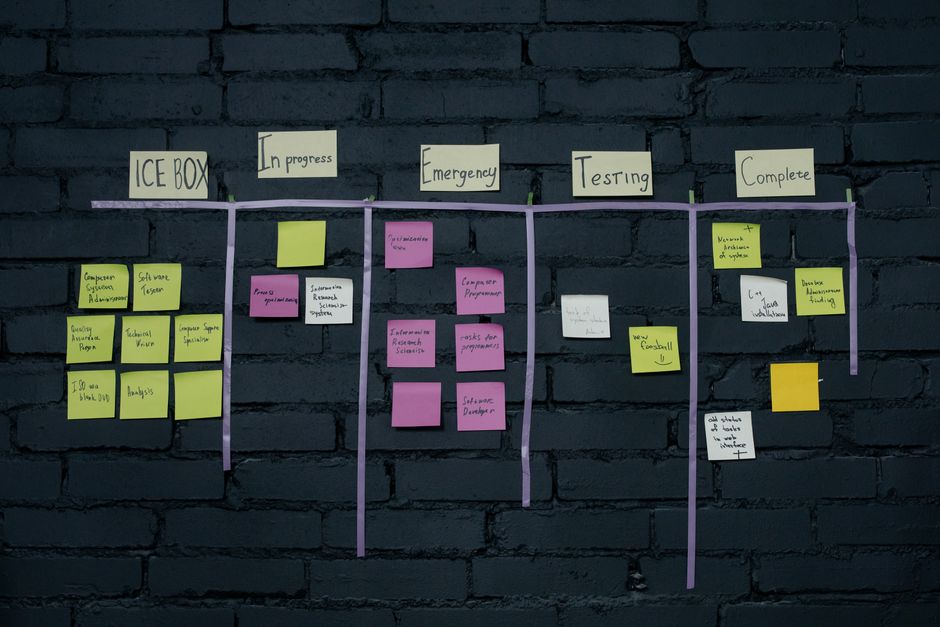
Naplnite sprint-backlog počas relácie najvyššou prioritou úloh, ktoré sú pripravené vo vašich prostrediach. Definujte cieľ pre iteráciu a zarovnajte úlohy podľa toho.
- Etapa a kompozícia: Definujte etapu pre sprint-backlog–pbis, rozložené úlohy, kritériá akceptácie a stručný súhrn obsahu, ktorý vedie denný práce. Zabezpečte, aby každá položka mala odhad bodov a jasnú definíciu dokončenia. Nastavte cieľ pre iteráciu a mapujte položky na výsledky.
- Spolupráca a rafinácia: Tím spolupracuje počas relácie na rafináciu položiek. Pred denným sa položky logujú na centrálnom mieste; vlastníctvo je jasné; odovzdania definované.
- Naplnenie a priradenie: Po rafinácii naplňte pbis do plánu rozložením na úlohy, zarovnaním na etapu pre analýzu, vývoj, testovanie alebo recenziu a priradením vlastníkov. Používajte prostredia na zabezpečenie pripravenosti naprieč kontextami.
- Odhad a plánovanie: Priraďte odhad bodov každej úlohe; použite konzistentnú škálu (napr. 1-5); udržte celky v rámci kapacity tímu; monitorujte náklady na vyhnutie sa prekročeniam.
- Sledovanie a metriky: Používajte burndown a iné metriky denne na monitorovanie pokroku a úpravu. Logované aktualizácie podľa výskytu; udržiavajte organizované záznamy v centralizovanom nástroji; zdieľajte pokrok s tímom a zainteresovanými stranami.
- Zdieľanie a transparentnosť: Zdieľajte aktuálny obsah so zainteresovanými stranami; udržujte ho logovaný na centrálnom mieste; zabezpečte, aby správni ľudia mali prístup; udržiavajte vysokú viditeľnosť na zníženie rizík.
- Recenzia a adaptácia: Na konci každej etapy recenzujte dokončené položky a upravte zostávajúce úlohy, aby ste zostali organizovaní naprieč sprintami; keď sa položky presunú, odovzdanie na prácu nasledujúceho dňa je jasné; denný pokrok pokračuje počas celej doby.
Ako Vytvoriť Sprint Backlog: Praktický Sprievodca Scrum Riadením Projektov – Krok 2: Identifikujte Relevantné PBIs
Začnite zarovnaním s vlastníkom a jadrovými členmi na začiatku na identifikáciu PBIs, ktoré dodávajú jasnú hodnotu zákazníkom. Poskytovanie stručných popisov pre každú položku pomáha tímu veriť v účel a znižuje nejednoznačnosť. Používajte grafy na vizualizáciu relatívneho úsilia, hodnoty a rizika, či už je práca už viditeľná na doske tu alebo ešte pod dohľadom. Toto prebiehajúce úsilie podporuje zníženie posunu rozsahu a ponúka viditeľné súhrny pre zainteresovaných strán.
Definujte, čo robí položku skutočne relevantnou: definuje prospech pre zákazníka, zarovnáva sa s celkovými cieľmi a nesie testovateľné kritériá akceptácie. Každý PBI by mal mať realistický odhad a určeného vlastníka. Keď vzniknú otázky, vlastník na ne odpovie s konkrétnym odôvodnením. To zabezpečuje, že existuje zarovnanie so strategickými prioritami a očakávaniami zákazníkov.
Odhad má význam: aplikujte relatívne veľkosti pomocou bodov, s cieľom konzistentných porovnaní naprieč položkami. Zachyťte odhady a udržiavajte denné aktualizácie na odraz toho, čo zostáva, čo pomáha tímu zostať zameraným a zabraňuje posunu. Používajte burndown graf na vizualizáciu pokroku, umožňujúc vám vidieť, koľko práce zostáva a ako sa krivka utvorí pre celkový pracovný tok.
Postupné kroky bez nejednoznačnosti: zhromaždite kandidátske PBIs, potom rozložte väčšie položky na menšie kusy. Priraďte vlastníka pre každú položku, rafinujte kritériá akceptácie a označte položky ako pripravené na vykonanie. Krátky skript alebo checklist na začiatku relácie štandardizuje prístup, pomáha členom zostať zarovnanými a rýchlo odpovedať na kľúčové otázky o uskutočniteľnosti a dopade.
Výstup a viditeľnosť: udržiavajte pohľad v štýle scrumboardu, ktorý zdôrazňuje najvplyvnejšie položky prvé. Tu súhrny odhaľujú dodanú hodnotu, zatiaľ čo grafy poskytujú kontext potrebný zákazníkom a iným zainteresovaným stranám. Prebiehajúci rytmus podporuje denný interakciu a udržiava tím zameraný na najdôležitejšie body.
| Položka | Popis | Odhad (body) | Vlastník | Hodnota pre zákazníka | Kritériá akceptácie | Stav |
|---|---|---|---|---|---|---|
| PBI-101 | Prúd prihlásenia a registrácie používateľa s základným spracovaním chýb | 5 | Alice | Vysoká | Úspešná autentifikácia, chybové správy a ACs dostupnosti | Pripravený |
| PBI-102 | Výsledky vyhľadávania s filtrami a jasným zvýraznením top výsledkov | 3 | Ravi | Stredná | Presné filtrovanie, responzívny layout, prístupné ovládacie prvky | Pripravený |
| PBI-103 | Zlepšenia prúdu pokladne a zefektívnený vstup dát | 5 | Mina | Vysoká | Celý koniec-koncový chod funguje, chybové stavy pokryté, výkon akceptovateľný | Prebieha |
| PBI-104 | Mobilná responzivita pre stránky produktov | 3 | Jon | Stredná | Layout sa prispôsobuje bodom prelomu, dotykové ciele spĺňajú štandardy | Otvory |
Čo sa počíta ako PBI a čo nie (PBIs vs. chores, bugs, tasks)
PBIs by mali byť položky, ktoré prispievajú k dodaniu hodnoty používateľovi; úlohy, chores a chyby, ktoré neposkytujú priamu hodnotu, zostávajú oddelené, pokiaľ neodomknú novú schopnosť alebo neodstránia prekážky. Každý PBI by mal byť malý a overiteľný, s detailmi a kritériami akceptácie, aby inšpekcia mohla overiť pokrok a tím mohol efektívne plánovať. Zahŕňajte jasný popis, očakávaný dopad na používateľa a úvahy o značke na udržanie konzistentnej skúsenosti.
Aktuálne položky sa hodnotia podľa hodnoty, rizika a dopadu na používateľa. PBIs zahŕňajú nové schopnosti, vylepšenia, ktoré zlepšujú prúdy, a prácu, ktorá mení, ako používatelia pristupujú k funkciám. Ak chyba blokuje prístup, narúša kritický chod alebo zhoršuje dôveru, tá chyba sa môže presunúť do PBI; kozmetické defekty alebo rutinná údržba zostávajú ako úlohy na zefektívnenie rytmu. Termíny používané na popis týchto položiek by mali byť konzistentné, aby tímy a zainteresované strany mohli nájsť, recenzovať a porovnať prácu.
Kroky na identifikáciu skutočných PBIs: identifikujte najmenšiu jednotku, ktorá dodáva viditeľnú zmenu; analyzujte aktuálne potreby používateľa; overte so zainteresovanými stranami na stretnutiach; zabezpečte kritériá akceptácie, plán a detaily; skontrolujte, že práca posúva produkt dopredu a zabraňuje prehliadnutým medzerám; ak prejde inšpekciou, označte ju ako PBI. To pomáha tímom používať spoločný súbor termínov a udržiava konzistentnú značku.
Rytmus inšpekcie a recenzie: na začiatku každého cyklu inšpekujte aktuálne položky; zabezpečte, aby každý PBI mal odznak indikujúci pripravenosť; na stretnutiach hodnotte hodnotu, riziko a zarovnanie značky; aktualizujte prístupové termíny podľa potreby; poskytovanie aktualizácií udržiava plán viditeľný a pomáha udržiavať zainteresované strany zarovnané.
Bežné pasce a vyhýbanie sa im: prehliadnuté PBIs sa objavia, keď hodnota nie je viazaná na výsledky používateľa; zabezpečte zahrnutie závislostí a dopadu na aktuálne pracovné toky; odlíšte chyby, ktoré blokujú prístup, od kozmetických defektov, ktoré sú nižšou prioritou a mali by byť riešené ako úlohy. Identifikujte prekážky skoro, nájdite, kde sú zmeny potrebné, a prijmite korigujúce akcie počas stretnutí, aby ste udržali pokrok na koľajach.
Praktické tipy pre tímy: používajte jednoduché termíny priateľské k značke, udržiavajte PBIs malé a vyvíjajte ich podľa učenia; zabezpečte, aby práca poskytovala merateľný pokrok; používajte úlohy na podporu PBIs, ale nenahrádzajte ich; poskytnite jasný plán, sledujte zmeny a prijmite akcie, ktoré zefektívňujú skúsenosť. Výsledkom je čistejší súbor PBIs, ktorý pomáha dosiahnuť rýchlejšie dodanie hodnoty a zlepšuje celkovú skúsenosť pre používateľov a partnerov.
Ako extrahovať PBIs z Product Backlogu pre sprint
Začnite filtrovanie položiek podľa hodnoty pre zákazníkov a uskutočniteľnosti, potom zoradiť podľa dopadu verzus úsilie, aby sa zmestili do kapacity tímu. Tu je praktická metodika na ťahanie PBIs pre nadchádzajúci cyklus bez nafúknutia plánovacích relácií:
Krok 1 – kategorizujte a riešte. Skontrolujte každú položku a priraďte kategórie ako obsah, integrácia, UI, kvalita dát a výkon. To pomáha adresovať oblasti a zarovnáva sa s vyvíjajúcimi sa cieľmi produktu. Pre každú položku zachyťte, aký wireframe alebo mockup je potrebný a označte etapu. Artefakt produkovaný je rafinovaný zoznam s identifikovanými úrovňami priority a odkazom na pôvodnú požiadavku. Ak je to možné, potiahnite ďalšiu položku, ktorá demonštruje podobný vzor na overenie konzistencie.
Krok 2 – inšpekcia a spätná väzba. Proveďte krátke stretnutie so zákazníkmi alebo zástupcami na zhromaždenie spätnej väzby o navrhnutých položkách. Používajte referenčné dáta na úpravu hodnotenia; táto inšpekcia minimalizuje nesúlad a pomáha riadiť očakávania. Každá položka by mala mať kritériá akceptácie a definovanú etapu; dodaný obsah by mal byť pripravený na začatie, znižujúc náročnú prepracovanie.
Krok 3 – plánovanie a dodanie. Pre každú položku, ktorá prejde, odhadnite kapacitu a naplánujte sekvenciu práce. Ak je kategória náročná, rozdeľte ju na menšie kusy a adresujte ďalšiu súvisiacu položku. Výstupom je kompaktný súbor PBIs, ktorý sa zmestí do cyklu a podporuje inkrementálne dodanie. Hlavným cieľom je dodávanie inkrementov riadených obsahom, ktoré uspokojujú zákazníkov a zainteresované strany, pri udržiavaní stabilného rytmu stretnutí a aktualizácií.
Ako zarovnať PBIs so sprintovými cieľmi a hodnotou používateľa
Odporúčanie: mapujte každý PBI na ostrý cieľ iterácie a priamu hodnotu používateľa pred plánovaním; používajte ľahký checklist zarovnania a zabezpečte, aby všetky PBIs boli recenzované pre zarovnanie hodnoty, potom zdieľajte správy a aktualizácie s tímom.
- Krok 1: Definujte cieľ iterácie s aktívnou účasťou členov; cieľ by mal byť realistický a viazaný na hmatateľný výsledok používateľa. Zachyťte ho v poznámkach plánovania a odrážte v agende stretnutia.
- Krok 2: Vybudujte maticu PBI-na-hodnotu: pre každý PBI spojte so súvisiacou používateľskou historkou, priraďte merateľný výsledok a uveďte kritériá akceptácie. Udržte maticu zjednodušenú, aby sa dala rýchlo recenzovať; to pomáha predchádzať prehliadnutým detailom a udržiava aktualizácie zamerané.
- Krok 3: Prioritizujte s jasným kompromisom: hodnota verzus úsilie. Označte PBIs ako prioritizované a vytvorte ďalší súbor úloh s najvyšším dopadom. Tento prístup minimalizuje nehodnotovú prácu a zarovnáva pohyb smerom k tomu, na čom používateľom záleží.
- Krok 4: Posúďte kapacitu a realizmus: odhadnite úsilie s jednoduchými jednotkami, overte, že celkové úlohy sa zmestia do cyklu, a upravte počiatočný rozsah ak je to potrebné. Používajte posúdenie na udržanie očakávaní na zemi.
- Krok 5: Priraďte kto a zodpovednosti: priraďte vlastníkov pre každý PBI, vrátane súvisiacich úloh, aby ste sa vyhli zmätku. Ak sa člen tímu trápi, zapojte inú osobu alebo prealokujte podporu na predchádzanie fľakom.
- Krok 6: Proveďte zamerané diskusie na plánovacích a recenzujúcich stretnutiach: recenzujte stav, zdieľajte aktualizácie a potvrďte, že dodané inkrementy spĺňajú kritériá akceptácie. Zabezpečte, aby správy odrážali pokrok a blokátory, a dokumentujte akékoľvek zmeny.
- Krok 7: Monitorujte pokrok kontinuálne: používajte krátke, časté check-iny na zachytenie nesúladov; zahŕňajte spätnú väzbu od používateľov, keď je to možné. Udržte záznam aktualizácií a zabezpečte, aby akékoľvek úpravy zostali zarovnané s cieľom iterácie.
Ako písať kritériá akceptácie pre každý PBI
Náčrtujte kritériá akceptácie pre každé pbis na adresovanie medzier pred začatím práce; tento náčrt poskytuje overiteľný cieľ pre inžiniera na efektívne vykonávanie úloh a udržiava role zarovnané smerom k zdieľaným výsledkom, znižujúc voľnosť a zabezpečujúc potrebné kontroly na miestach naprieč mesiacmi adresovanými tímom.
Používajte formát časť-po-časti, ktorý robí každé kritérium testovateľným: opíšte podmienku, vstup a očakávaný výsledok. Každé kritérium by malo byť akčné, aby sa dalo overiť bez nejednoznačnosti. Rozdeľte pbis na jasné časti na pomoc s pochopením. V jira pripojte stručný checklist k pbis, ktorý inžinier môže zaškrtnúť na ukázanie dokončenia; táto štruktúra podporuje spätnú väzbu od qa a zainteresovaných strán a pomáha mnohým pbis pohybovať sa smerom k spoločnej definícii dokončenia.
Vytvorte kritériá akceptácie s jednoduchým, opakateľným formátom, ako Given-When-Then alebo krátky checklist, zabezpečujúc, aby každá položka bola malá, čitateľná a overiteľná. Pravdepodobne náročné scenáre by mali byť adresované pridaním hraničných prípadov a explicitných testov akceptácie, aby tím mohol riešiť ich v prvom priechode namiesto návratu k nim neskôr. Pre komplexné pbis špecifikujte viac testových prípadov a nastavení dát na zníženie prekvapení počas dokončovania práce.
Udržte pomer kritérií k pbis realistický; zahŕňajte dosť detailov na predchádzanie nejednoznačnosti bez preťaženia jedinej položky. Cieľ 3–6 kritérií na pbis funguje dobre; používajte testovacie dáta a mock služby podľa potreby; pozerajte sa dole zoznamu na overenie, že nič nechýba, a solicitujte spätnú väzbu tu od zainteresovaných strán na zabezpečenie zarovnaných bezpečnostných opatrení. Tento prístup podporuje riadenie závislostí medzi tímami a mnohí inžinieri pracovali spolu na podobných cykloch.
Publikujte kritériá akceptácie v žijúcom náčrte, ktorý sa vyvíja s pbis. Prístup poskytuje jasnú cestu smerom k dokončeniu dodania a sledovateľný záznam pre mesiace práce; zisk je predvídateľný tok od dizajnu k dodaniu, s grafmi ukazujúcimi stav, pokrytie rolami a výsledky testovania, všetko prepojené v jira pre viditeľnosť.
Ako odhadnúť PBIs a pripraviť ich na rafináciu
Začnite s ľahkou základňou: vyberte jeden pbis strednej komplexity, odhadnite ho v bodoch a použite ho ako referenciu na veľkosť ostatných. To podporuje adaptáciu a udržiava tím produktívny, najmä pri čelení preplnenému zoznamu položiek viditeľnému v reálnom čase na scrumboarde. Tento prístup vyhýba sa nadmernému záväzku a prináša jasné výsledky smerom k rýchlejšej rafinácii.
Kroky na prípravu pbis na rafináciu: začnite zabezpečením, aby každá položka mala jasné kritériá a odvodenú definíciu dokončenia. Používajte rýchlu kontrolu na potvrdenie, že nie je nejednoznačnosť; pripojte predbežný odhad bodov a cieľový dátum, kde je to relevantné. Uložte tieto poznámky do správ a umiestnite položky na scrumboard s viditeľným stavom.
Technika odhadu: používajte relatívne veľkosti s planning poker. Používajte malý súbor veľkostí (1,2,3,5,8,13) a nech každý člen tímu odhalí súčasne na demonštráciu zarovnania. Zachyťte konečnú hodnotu ako body a pripojte odôvodnenie vedľa nej. To pomáha ostatným porovnávať rôzne pbis bez nekonečnej debaty.
Reálny časový pracovný tok: tu je rýchly checklist na overenie pripravenosti: udržujte pbis na doske v stĺpci ready-for-refinement; aktualizujte podľa pohybu položiek od nových k pripraveným. Proces by mal byť ľahký; kontrolujte často na vyhnutie sa blokáciám. Používajte scrumboard na sledovanie pokroku smerom k dokončeniu rafinácií v iterácii.
Prioritizované a informované: pred rafináciou zoradiť pbis podľa obchodnej hodnoty, rizika a závislosti. Používajte jednoduché pravidlo: čo dodá spokojnosť zainteresovaným stranám prvé. Informujte tím o zmenách a potvrďte, že najdôležitejšia práca je pripravená na diskusiu.
Kvalita a jasnosť: každá položka by mala ukazovať, čo bude dodané, kritériá akceptácie a akékoľvek závislosti. Ak je položka považovaná za príliš vágne, rozdeľte ju na menší pbis. Tento krok znižuje prepracovanie neskôr a udržiava celkový proces plynulý. Zvážte pripojenie malého grafu, ktorý ukazuje relatívnu veľkosť a riziko pre rýchle vizuálne kontroly.
Bežné chyby na vyhnutie sa: miešanie odhadov úsilia s komplexitou; podceňovanie integračnej práce; zlyhanie v príprave testovacích dát; zanedbávanie označenia položiek ako blokovaných. Ak sa ťažko dosahuje konsenzus, navštívte základnú položku a upravte, kým sa tím nedohodne.
Recenzia pripravenosti: proveďte rýchlu kontrolu proti cieľu; zabezpečte, aby každý pbis mal jasné odôvodnenie, definovaný výsledok a uskutočniteľný plán na vykonanie počas ďalšieho cyklu. Používajte reálne časové dashbordy na potvrdenie zarovnania s plánom.
Príklady a výsledky: 1) funkcia hlásenia dát s 5 bodmi; 2) leštenie UI s 2 bodmi; 3) spike na objasnenie požiadavky s 3 bodmi. Sledujte videné zlepšenia v metrikách spokojnosti a upravte podľa potreby.
Smerom k úspechu rafinácie: tím môže demonštrovať dôveru v odhady konzistentným dodávaním položiek zarovnaných s cieľom; používajte návrhy zo správ na zlepšenie ďalšieho kola. Kľúčom je adaptovať a iterovať rýchlo, nie preplánovať túto fázu.
Odoslať stručný dopyt
Opíšte web, ciele, publikum a rozpočet na prípravu ponuky.
Related Articles

SimilarWeb API Key: Kompletný sprievodca nastavením, správou a osvedčenými postupmi
June 29, 2026
Ako implementovať vašu B2B marketingovú stratégiu s obsahom: Praktický krok za krokom sprievodca
December 23, 2025