Shopify SEO -sovellukset – Ovatko ne sen arvoisia? Käytännön opas kaupan näkyvyyden parantamiseen
Shopify on valmiiksi SEO-ystävällinen, mutta useimmat kaupat osuvat nopeasti kattoon. Syy on yksinkertainen: verkkokaupan SEO vaatii jatkuvaa sivukohtaista työtä, teknisiä tarkistuksia ja nopeuden hallintaa. SEO-sovellukset voivat auttaa siinä. Ne eivät kuitenkaan ole taikaa. Todellinen kysymys on, tuovatko ne mitattavaa ROI:ta kaupallesi.
Tämä opas käy läpi, milloin Shopify SEO -sovellukset ovat hyödyllisiä, mitä niissä kannattaa etsiä ja miten mitata vaikutusta arvaamatta.
Nopea vastaus: kyllä, jos testaat ne oikein
Shopify SEO -sovellus on hyödyllinen, kun se säästää aikaa ja parantaa sijoituksia tai konversioita. Selvittääksesi asian, aloita pienestä:
- Asenna yksi nopeudelle optimoitu SEO-sovellus.
- Seuraa perustasomittareita.
- Mittaa vaikutusta 6–8 viikon ajan.
Jos orgaaninen liikenne ja myynti kasvavat, päätös on selvä. Jos ei, poista sovellus ja testaa toista lähestymistapaa. SEO-sovellusten tulisi ansaita paikkansa pinossasi.
Miksi Shopify SEO -sovellukset voivat toimia
SEO-sovellukset ovat hyödyllisiä, koska ne automatisoivat toistuvia tehtäviä suurissa määrissä. Monille kaupoille se tarkoittaa:
- Metatietojen optimointia tuotteille ja kokoelmille kerralla
- Rakenteisen tiedon (schema) asetusta vähemmillä virheillä
- Kuvien pakkausta ja alt-tekstin automatisointia
- Uudelleenohjausten ja 404-sivujen siivoamista
- Sivukartan parannuksia
Yhteenvetona ne vähentävät manuaalista työtä ja auttavat soveltamaan SEO-sääntöjä johdonmukaisesti.
Milloin SEO-sovellukset eivät ole hyödyllisiä
SEO-sovelluksia ei kannata maksaa, jos:
- Kaupassasi on alle ~30 tuotetta ja voit optimoida manuaalisesti.
- Sovellus lisää raskaita skriptejä ja hidastaa mobiilisuorituskykyä.
- Sinulla on jo vahvat sisäiset SEO-työnkulut ja tekninen tuki.
- Haluat sovelluksen ”korjaavan SEO:n” ilman strategiaa.
Sovellus voi tukea strategiaasi, mutta se ei voi korvata sitä.
Mitä priorisoida Shopify SEO -sovelluksessa
Kaikki sovellukset eivät ole samanarvoisia. Valitse kaupan koon, teeman ja tavoitteiden perusteella.
1. AI-pohjainen metatietojen ja avainsanojen tuki
Etsi työkaluja, jotka voivat luoda tai parantaa:
- Otsikkotageja
- Metakuvauksia
- Tuote- ja kokoelmapohjia
- Avainsanaehdotuksia
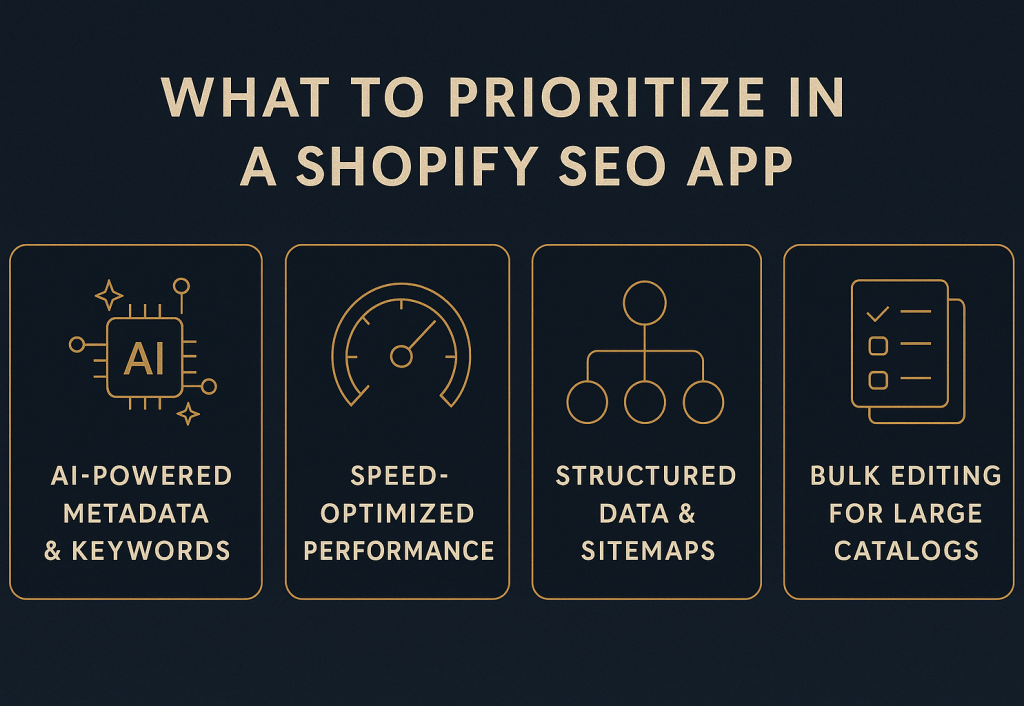
Neljä ydinkriteeriä, jotka tekevät Shopify SEO -sovelluksesta testattavan.
AI on hyödyllinen täällä, mutta vain jos tarkistat tulokset ja pidät ne linjassa brändisi äänen kanssa.
2. Nopeudelle optimoitu suorituskyky
Nopeus on sijoitus- ja konversiokerroin. Vältä sovelluksia, jotka paisuttavat näyteikkunaasi.
Valitse sovelluksia, jotka:
- Latautuvat tehokkaasti
- Eivät injektoi suuria skriptejä koko sivustolle
- Sallivat valikoivan aktivoinnin tietyille sivuille
- Jakoavat nopeustietoja tai Core Web Vitals -palautetta
3. Rakenteisen tiedon ja sivukartatyökalut
Shopify-teemat vaihtelevat paljon. Sovelluksesi tulisi tarjota:
- Tuoteschema
- Kokoelmaschema
- Murupolkuschema
- Rikkaiden tulosten testausta
- Dynaamisia, puhtaita sivukartan päivityksiä
4. Massamuokkaus ja suuren katalogin tuki
Jos hallitset 500+ tuotetta, massatyökalut ovat välttämättömiä. Vahvista:
- Massamuokkauksia tuotteille, kokoelmille, blogeille
- Tuonti/vienti-asetuksia
- Ohjaimia pohjaa tai sivutyyppiä kohti
5. Teeman ja PageFly-yhteensopivuus
Jos käytät PageFly:tä (tai vastaavia rakentajia), tarkista yhteensopivuus ensin.
Hieno sovellus tulisi toimia olemassa olevien pohjiesi kanssa ilman kovakoodimuutoksia.
Käytännön Shopify SEO -strategia (sovelluksilla tai ilman)
Sovellusten tulisi tukea strukturoitua SEO-suunnitelmaa. Aloita suurvaikutteisilla sivuilla ja etene ulospäin.
Vaihe 1: Korjaa tekniset virheet ensin
Suorita indeksointi ja siivoa:
- 404-sivut
- Uudelleenohjauskulut
- Duplikaatti-URL:t
- Kanoninen tagiongelmat
Nämä korjaukset parantavat indeksoitavuutta nopeasti.
Vaihe 2: Optimoi parhaat tuotesivut ja kokoelmat
Keskity 20 %:iin sivuista, jotka ajavat suurimman osan tuloista.
Päivitä:
- Otsikot
- H1-otsikot
- Metakuvaukset
- Tuotekopio (vältä duplikaatteja)
Vaihe 3: Rakenna sisäiset linkit systemaattisesti
Sisäiset linkit levittävät auktoriteettia. Tee se harkiten:
- Linkitä kategoria-sivuilta parhaisiin myyntituotteisiin
- Korjaa orposivut
- Luo pilari-sisältöä ja linkitä kokoelmiin
Vaihe 4: Lisää Shopify-spesifistä rakenteellista tietoa
Schema on tärkeämpi verkkokaupassa, koska se tehostaa rikkaita tuloksia.
Tavoittele schemaa:
- 70 %+ tuotesivuilla
- Kokoelmissa
- Murupoluissa
- Arvosteluissa (kun relevanttia)
Vaihe 5: Käsittele monikielinen SEO oikein
Jos palvelet useita alueita, tarvitset puhtaita signaaleja.
Toteuta:
- hreflang-tageja
- Käännettyjä metatietoja
- Kielikohtaisia sivukarttoja
- Oikeita kanonisia alueittain
Tämä vähentää duplikaatteja ja nostaa näyttökertoja markkinakohtaisesti.
Vaihe 6: Suojaa nopeus jokaisella vaiheella
SEO-hyödyt katoavat, jos kaupastasi tulee hidas.
Tavoitteet:
- Mobiililatausaika alle 2 sekuntia
- LCP < 2,5 sek
- CLS < 0,1
Tee tämä:
- Pakkaamalla kuvia (WebP)
- Lataamalla laiskasti fold-alta löytyvät resurssit
- Minimoiden CSS/JS
- Poistamalla käyttämättömiä sovelluksia
Sivukohdan SEO:n automatisointi sovelluksilla
Automaatio on hyödyllisin keskikokoisille ja suurille katalogeille.
Otsikkotagin automatisointi
Pidä otsikot johdonmukaisina ja yksilöllisinä.
Luotettava kaava:
{Pääavainsana} – {Tuotenimi} | {Brändi}
Säännöt:
- Alle 60 merkkiä
- Pääavainsana ensin
- Ei duplikaatteja
Metakuvauksen automatisointi
Metakuvaukset parantavat CTR:ää. Käytä puhdasta pohjaa kuten:
Koe {tuote}. {ominaisuus/etua}. Nopea toimitus ja helppo palautus.
Säännöt:
- 150–160 merkkiä
- Selkeä etu + CTA
- Vältä avainsanojen täyttöä
Alt-tekstin automatisointi
Alt-teksti tukee saavutettavuutta ja kuvien SEO:ta.
Pohjaesimerkki:
{Tuote} {kokoelmassa} näyttäen {ominaisuuden}
Säännöt:
- Alle 125 merkkiä
- Kuvaileva, ei roskapostimainen
- Sisällytä avainsana vain luonnollisesti
Massapäivitysten jälkeen lähetä sivukarttasi uudelleen nopeuttaaksesi indeksointia.
Vaikutuksen mittaaminen ja ROI:n todistaminen
Et tarvitse monimutkaisia työkaluja. Tarvitset selkeyttä ja johdonmukaisuutta.
Seuraa viikoittain:
- Avainsanasijoituksia (prioriteettiryhmät)
- Orgaanista liikennettä ja laskeutumissivuja
- Indeksoinnin nopeutta
- CTR-muutoksia
- Orgaanisia konversioita ja tuloja
Käytä yksinkertaista ROI-kaavaa:
ROI = (Orgaaniset tulot – SEO-kustannukset) ÷ SEO-kustannukset × 100
Sisällytä sovelluskustannukset ja sisällön kustannukset. Jos ROI on positiivinen ja vakaa, jatka skaalaamista.
Sovelluskuormituksen vähentäminen SEO:n parantamiseksi
Enemmän sovelluksia = enemmän skriptejä = hitaampi kauppa.
Tee neljännesvuosittainen tarkastus:
- Poista ensin matalan ROI:n sovellukset.
- Yhdistä päällekkäiset toiminnot yhteen työkaluun.
- Vähennä tai asynkronoi ei-kriittiset skriptit.
- Lataa raskaat widgetit vasta käyttäjän vuorovaikutuksen jälkeen.
Käytännössä 2–3 sovelluksen poistaminen voi leikata JS-kuormaa 150–300 KB:lla ja parantaa LCP:ää ~0,3–0,7 sekunnilla. Se yleensä nostaa sekä sijoituksia että konversioasteita.
Lopputulos
Shopify SEO -sovellukset ovat hyödyllisiä, jos ne tekevät kaksi asiaa:
- Pitävät kaupan nopeana.
- Tuo mitattavan nousun orgaanisessa liikkeessä tai myynnissä.
Aloita yhdellä sovelluksella, testaa 6–8 viikon ajan ja tee päätös datan perusteella. Yhdistä automaatio strukturoituun SEO-strategiaan, niin näet kumuloituvia tuloksia 8–12 viikon aikana.
📚 Lisää SEO:sta ja digitaalisesta markkinoinnista
- Verkkokaupan SEO - Lopullinen opas näkyvyyden ja myynnin parantamiseen vuonna 2026
- Shopify-kanoninen URL-opas - Miten korjata duplikaattisisältö ja parantaa SEO:ta
- 10-vaiheinen SEO-tarkastus verkkokaupalle - Käytännön opas (2026)
- Shopify SEO -tarkistuslista - Aloittelijan opas (2026)
- Verkkokaupan SEO 2026 - Täydellinen opas strategiaan ja trendeihin
Lähetä lyhyt tiedustelu
Kuvaile sivusto, tavoitteet, kohderyhmä ja budjetti tarjousta varten.


